When choosing a web hosting provider, performance and pricing are important—but user experience (UX) and interface design (UI) also play a major role in how easily you can manage your website. InterServer is known for its reliable hosting services and transparent pricing, but its interface often sparks discussion among users.
While the platform delivers powerful hosting tools through cPanel and DirectAdmin, its design feels somewhat dated compared to newer hosting platforms. In this guide, we take a deeper look at InterServer’s dashboard, control panel experience, and overall usability.
InterServer UX/UI Overview
InterServer’s interface is built primarily around traditional hosting control panels. The platform focuses more on functionality and reliability than visual polish. While this approach ensures stability and familiarity for experienced users, beginners may find the layout less intuitive.
Compared with modern hosts that offer custom dashboards, InterServer relies heavily on classic hosting management systems. These tools work well but may appear cluttered or outdated when placed beside newer interfaces.
However, the platform still provides clear service organization, transparent billing, and direct access to hosting tools, which remain strong advantages for many users.
1. Dashboard Experience
The InterServer dashboard acts as the central hub where users manage their hosting services.
Layout and Structure
The interface separates major services into different sections, including:
-
Web Hosting
-
Domains
-
VPS Hosting
-
Billing and invoices
This structure helps users locate their services quickly without digging through multiple menus.
Strengths
-
Clear separation of hosting services
-
Transparent billing information and invoices
-
Quick access to account settings and subscriptions
Weaknesses
Despite its functionality, the dashboard lacks many features common in modern hosting platforms:
-
Outdated visual design
-
Limited customization options
-
No modern card-based layouts or guided workflows
As a result, the dashboard can feel crowded and less intuitive, especially for users who are new to web hosting.
2. File Manager and Control Panel Tools
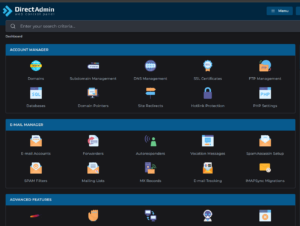
InterServer gives users full access to their server tools through cPanel or DirectAdmin, two of the most widely used hosting control panels.
Available Tools
The control panel includes essential website management features such as:
-
Domain and subdomain management
-
DNS configuration
-
SSL certificate management
-
FTP accounts
-
MySQL databases
-
Redirect management
-
Hotlink protection
-
File manager access
UX Strengths
One of the biggest advantages of this setup is that everything is accessible from a single control panel. Users can manage nearly every aspect of their website without relying on third-party tools.
Limitations
The design still resembles older versions of cPanel. This means:
-
Icons may appear dated
-
Navigation can feel cluttered
-
Beginners might find it overwhelming initially
However, experienced website owners often appreciate the familiarity and reliability of this traditional interface.
3. Editing .htaccess for Security and Access Control
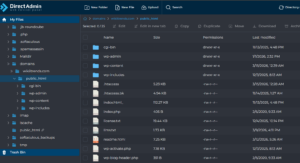
InterServer allows direct editing of the .htaccess file through the File Manager. This gives developers and administrators full control over server behavior, security rules, and traffic restrictions.
For example, site owners can configure rules that restrict access by location, block malicious traffic, or enforce security policies.
This level of access is powerful, particularly for advanced users managing security rules, redirects, and performance optimizations.
4. Error Handling and User Experience
When server restrictions are triggered—such as blocked access or permission errors—visitors may encounter a 403 Forbidden error page.
Default Experience
By default, the error page is very basic and contains minimal explanation. While functional, it can feel abrupt or confusing for visitors.
Improving UX
Website owners can improve the experience by creating custom error pages that explain why access is restricted and guide visitors to other parts of the website.
This small change can significantly improve:
-
User trust
-
Brand professionalism
-
Visitor engagement
5. GeoIP Blocking and Traffic Control
InterServer supports GeoIP-based access control, allowing administrators to restrict website traffic by country.
Why This Matters
GeoIP filtering can help with:
-
Reducing spam or malicious traffic
-
Compliance with regional regulations
-
Limiting access to a specific audience
UX Impact
While the feature improves security, it also affects visitor experience. Users from blocked locations may see access restrictions or redirection messages.
To maintain a professional experience, it is recommended to display custom explanatory pages instead of generic error messages.
6. Targeting Specific Regions
Some websites are designed specifically for certain markets, such as the United States. In these cases:
-
Visitors within the target region access the website normally
-
Visitors outside the region may be restricted or redirected
Administrators can still maintain access to their dashboards through configured exceptions.
This flexibility makes InterServer suitable for region-focused businesses and marketing campaigns.
7. Admin Login Experience
The administrator login experience is straightforward and secure.
Typical login elements include:
-
Username or email fields
-
Password authentication
-
Security verification options
While the system works reliably, the login interface could benefit from more modern design elements and stronger native integration with multi-factor authentication tools.
Strengths and Weaknesses of InterServer’s UX/UI
| Aspect | Strengths | Weaknesses |
|---|---|---|
| Dashboard | Clear service sections and transparent billing | Outdated design and cluttered layout |
| File Manager | All tools accessible from one place | Traditional cPanel appearance |
| Security Controls | Direct server rule editing available | No visual interface for rule creation |
| Error Handling | Custom pages can be configured | Default errors feel abrupt |
| Admin Experience | Reliable login and management tools | Limited modern UI enhancements |
Risks and Considerations
1. Learning Curve for Beginners
New users unfamiliar with traditional hosting panels may find the interface confusing at first.
Solution:
InterServer provides documentation and tutorials that help users understand the control panel.
2. User Experience During Access Restrictions
Visitors encountering default error pages may leave the site quickly.
Solution:
Implement custom error pages with clear messaging and branding.
3. GeoIP Database Accuracy
Country-based restrictions depend on accurate IP databases.
Solution:
Ensure location databases are updated regularly to prevent incorrect blocking.
Additional Features That Enhance the Experience
Although the interface may appear dated, InterServer still offers several features that improve usability and reliability.
Price Lock Guarantee
Unlike many hosting providers, InterServer offers a price lock guarantee, meaning your hosting cost remains the same after renewal.
One-Click Software Installers
The platform includes installers for popular applications such as:
-
WordPress
-
Joomla
-
Drupal
-
Magento
This makes launching websites easier, even for beginners.
Free Website Migration
Users switching from another hosting provider can request free website migration, reducing the technical work required during the transition.
Reliable Infrastructure
InterServer runs its own data centers and infrastructure, which helps maintain consistent performance and reliability.
Final Verdict
InterServer’s UX/UI can best be described as functional but dated. The platform prioritizes reliability, transparency, and full server control rather than sleek design.
For experienced developers and website administrators, this approach works well because it provides direct access to powerful tools and configurations.
However, beginners who expect a modern, simplified dashboard similar to newer hosting providers may find the interface less intuitive.
With improvements such as modernized dashboards, better onboarding guidance, and improved default error handling, InterServer could significantly enhance its user experience while maintaining the reliability it is known for.